In brief
- A good prompt (the instruction you give the AI) states the context, the task, the format you want and, if possible, an example. The more precise it is, the better the result.
- Choose the tool for the task: general-purpose assistant, search with sources, image, voice, code. Several excellent tools are free.
- Treat AI as a fast but fallible assistant: check the facts, protect your data, and keep the final decision.
On this page
Writing a Good Prompt: The Five-Element Method
The prompt is the message you send to the AI. The quality of the answer depends a lot on how clear it is. A simple structure works in almost every case:
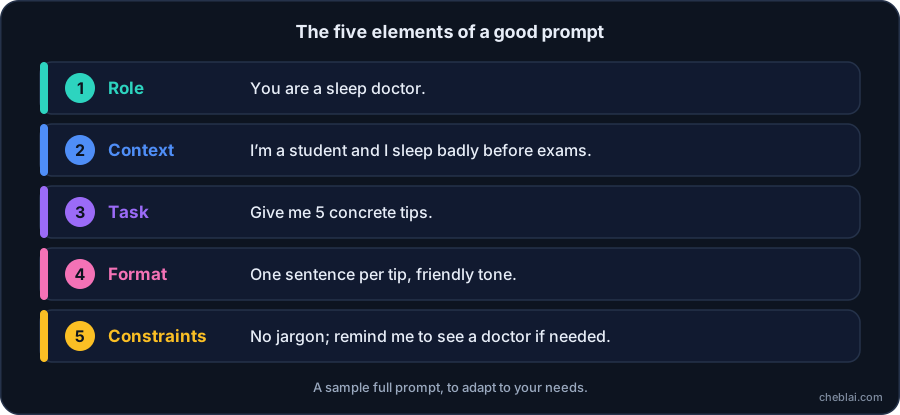
- The role
Tell the AI who it should be: “You are a career counselor…”
- The context
Give the useful information: your situation, your audience, your goal.
- The task
State clearly what you want, using an action verb: “Summarize,” “Compare,” “Suggest three ideas.”
- The format
Specify the form you expect: a table, a list of 5 points, 150 words, a formal or casual tone.
- Constraints and examples
Say what to avoid, or give an example of the result you want.
Don’t hesitate to iterate: a first answer is a draft. Ask for “shorter,” “simpler,” “with an example,” or “explain it to me as if I were 12.”
Choosing the Right Tool for the Task
| I want to… | Type of tool | To get started |
|---|---|---|
| Write, rephrase, summarize, think things through | General-purpose assistant | ChatGPT, Claude, Gemini, Mistral Le Chat |
| Look up information with sources | Answer engine | Perplexity AI |
| Understand documents I provide | Document assistant | NotebookLM |
| Translate | AI translator | DeepL |
| Improve my writing | Writing assistant | DeepL Write, Grammarly |
| Create images | Image generator | Midjourney, Canva AI, Stable Diffusion |
| Create a voice-over | Speech synthesis | ElevenLabs |
| Write code | Coding assistant | Cursor, GitHub Copilot |
To try tools without spending money, see our selection of free AI tools. To explore more widely and compare, use the directory and the comparison tool. Plans and prices change often: always check them on the tool’s official website.
Checking the Answers
Because an AI can hallucinate (see how ChatGPT works), adopt these habits:
- Ask for sources, then open them: the AI can invent links or references.
- Cross-check figures, dates and proper names against a reliable source.
- Be wary of sensitive areas: health, law, finance. AI can help you understand, but it can’t replace a professional.
- Ask the same question another way: if the answers differ, that is a warning sign.
- State the date if the information is recent: a model without web search doesn’t know current events.
Protecting Your Data and Staying Responsible
- Don’t share passwords, credit card numbers, medical data or confidential documents.
- Check in the settings whether your conversations are used to train the models.
- Say that you used an AI when it is expected (schoolwork, publications, advertising content).
- Always proofread before sending or publishing: you remain responsible for what you share.
To dig deeper into these issues, read limits, risks and regulation of AI.
Going Further
If you have worked through this learning path in order, you now know what AI is (definition), where it comes from (history), how it works (neural networks), learns (machine learning) and is built (how it is built). You also know about language models (ChatGPT), generative AI (images, video, audio) and its risks (regulation). The glossary brings together the key terms.
For concrete professional uses, browse CheblAI’s By profession and Collections pages.
Frequently asked questions
How do I write a good prompt?
Specify the AI’s role, the context, the task you want done, the format you expect and your constraints. The clearer the instruction, the better the answer. Then iterate: ask it to shorten, simplify or give an example.
What is the best AI tool for beginners?
To get started, a free general-purpose assistant such as ChatGPT, Claude, Gemini or Mistral Le Chat is enough. The best choice depends on your task: text, search with sources, image, voice or code.
Can I use AI for free?
Yes. Most major assistants offer a free plan with usage limits, and several tools are completely free or open source. See our selection of free AI tools and check the terms on the official website.
How do I fact-check information from an AI?
Ask for sources and open them, cross-check with a reliable source, rephrase the question to see whether the answer stays consistent, and be especially careful with figures, quotes and health, legal or financial topics.
Can AI replace a professional?
It can help you understand or prepare a topic, but it can’t replace the advice of a doctor, a lawyer or a financial advisor. It can be wrong and doesn’t know your exact situation.